If your like me, your doing some experimenting with AI at home.
Of course I'm still concerned about security, since some of what I produce may find it's way to a work proposal. Therefore, I came up with this plan for working with a localized environment. Specifically, my Razor Blade laptop running Ubuntu (now Arch) as the only OS.
If you have not yet checked out n8n, your really should take some time to watch a few youtube videos like this one of its capability.
Another great combo I'll write about soon is n8n, and mCP (Model Context Protocol), as the automation possible with these tools are amazing!
What is n8n?
n8n is an open-source, fair-code licensed platform for workflow automation, allowing users to connect over 400 apps and build AI-driven processes without extensive coding. It supports custom scripts in JavaScript and Python, making it versatile for localized AI setups where data privacy is crucial.
The key thing for me is that you can self-host n8n and run it in docker, which is perfect for running on your own infrastructure, as detailed in the n8n documentation.
My plan was to use n8n in docker, connected to Ollama running in a docker container also! (You can get an Ollama docker image here). I'll be writing about the addition of other tools like mCP. But for now, here is a bit of a breakdown:
What is Docker and How It Fits with LLMs? (a beginner level breakdown)
Docker is a containerization platform that packages applications and their dependencies into isolated containers, sharing the host OS kernel for efficiency. This makes it ideal for running large language models (LLMs)—AI systems trained on vast text data for tasks like text generation—locally, ensuring they work consistently across different setups. For example, running an LLM like Ollama in Docker ensures privacy and reduces cloud dependency, as explained in the Docker documentation.
(Note: we will also be looking at open-source docker alternatives like Podman.)
Implementing Localized AI
Example 1:
One of our customers required a multi-cloud solution that had servers running locally, and on IBM Cloud and AWS. Here is a simple workflow we created to check connectivity of all these servers and output the results to a log file.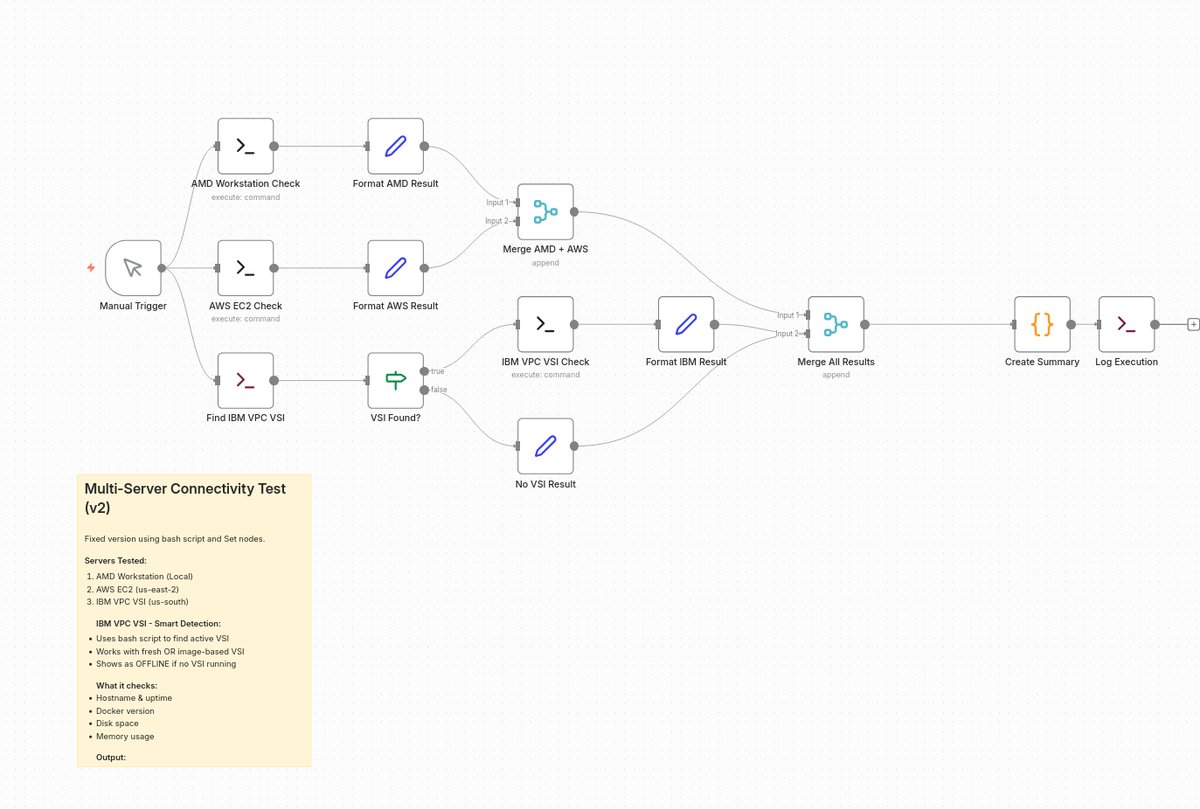
Example 2:
You can set up localized AI, use n8n’s Self-hosted AI Starter Kit, available at this GitHub repository. Just clone the repo and run docker-compose up to start n8n, Ollama (for LLMs), and supporting tools like Qdrant and PostgreSQL. This setup keeps all AI processing on-premise, which is ideal for sensitive industries.
Simple Example: Automating Desktop Functions with Python in n8n
You can automate desktop tasks. A simple example would be opening File Explorer and listing files, using a Python script in n8n. Here’s an example script using PYautoGUI, a library for GUI automation with python. (See this geeeks4geeks article)
Script Example: Automate opening File Explorer and listing files in a directory: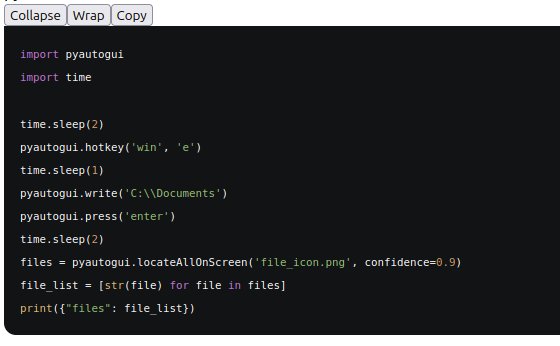 There is no limit to the workflows you can build in n8n: The genius is n8n’s visual interface which makes it much easier to create simple or complex workflows, while integrating a local LLM. This DataCamps tutorial workflow for example, creates a chatbot where users can ask questions about the series of Harry Potter movies using RAG (retrieval-augmented generation).
Here is what the example DataCamp n8n workflow looks like in n8n: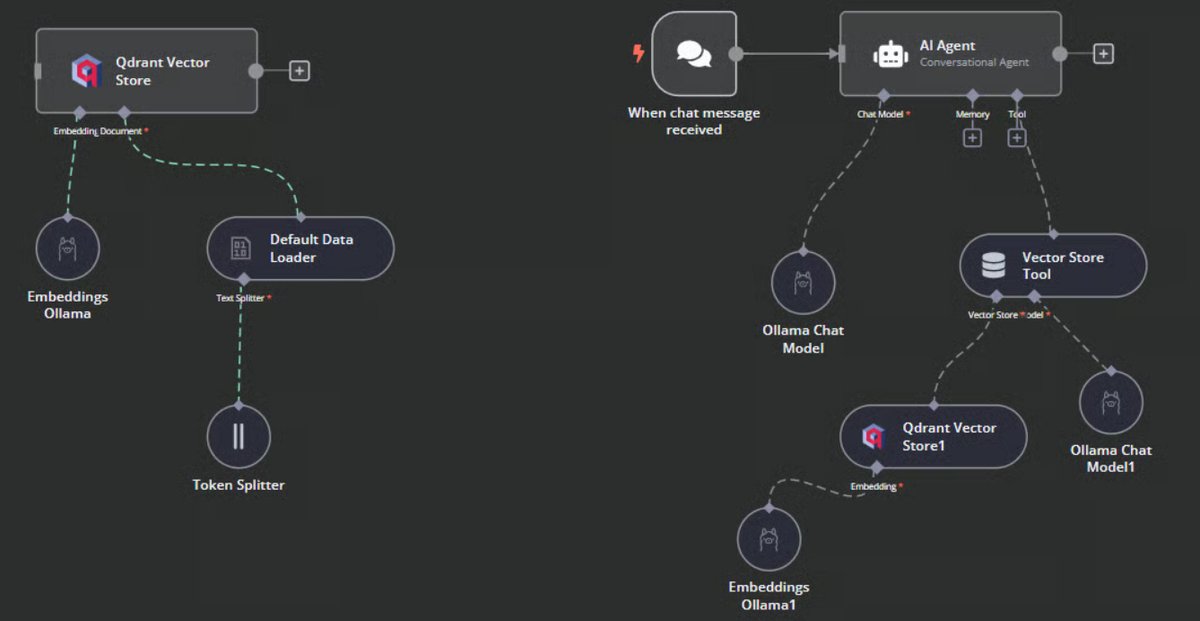
Conclusion
We will publish some of our own experiments with localized AI and workflow automation here. Making custom automation/AI solutions for our customers is exactly what Novique.AI is great at. Our customers do not need to hire an expensive IT staff, or rent servers, or manage complex solutions. We offer turn-key solutions that tie into your current business operations, saving you time and money.
Ready to put AI to work in your business?
Book a free consultation to discuss how Novique can help automate and optimize your business processes.