1Lab Overview
Lab Overview
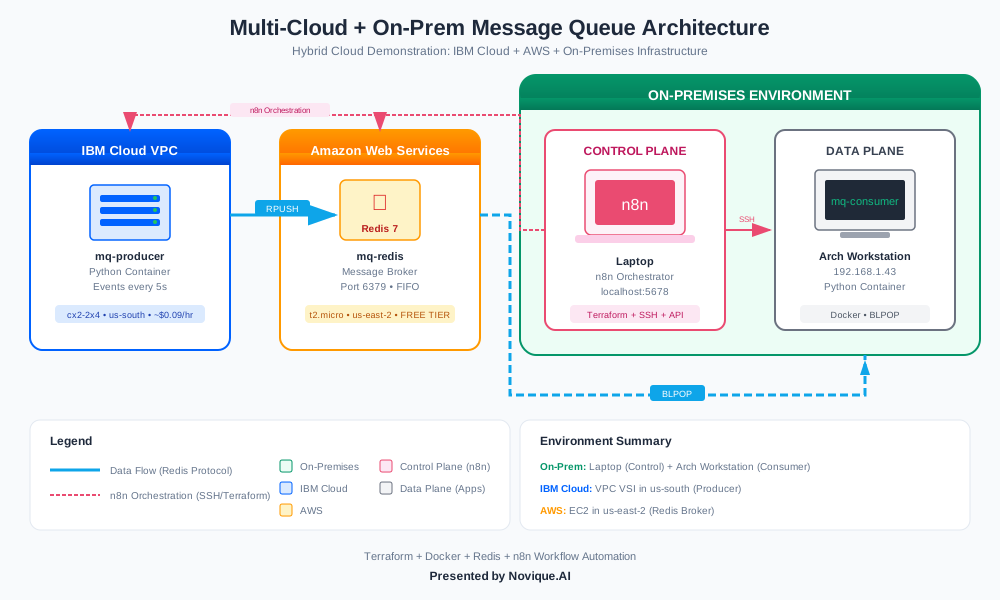
This lab was testing multicloud messaging service for a customer's distributed application. It demonstrates a comprehensive multi-cloud infrastructure orchestration platform that combines the power of n8n automation with Terraform to build, deploy, and manage distributed applications across multiple cloud providers. The key focus is on showcasing a real-world distributed message queue architecture spanning IBM Cloud, AWS, and an on-premises environment.
For public use, the target audience for this lab includes IT professionals interested in learning infrastructure as code, cloud automation, and cloud-native application deployment. The lab is suitable for both beginner and intermediate skill levels, as it covers a wide range of infrastructure management concepts, from Terraform provisioning to container-based microservices and event-driven messaging.
By working through this lab, you will learn how to use n8n workflows to automate the entire lifecycle of a multi-cloud infrastructure, from spinning up cloud resources to deploying and managing a distributed application. You will also gain practical experience with technologies like Docker, Redis, and cloud provider-specific tooling, equipping you with the skills to build and operate modern, resilient, and scalable infrastructure solutions.
The lab has a few key prerequisites, including familiarity with Docker and Docker Compose, as well as access to IBM Cloud and AWS accounts with the necessary permissions to provision resources. The documentation and code provided in the repository will guide you through the setup and execution of the lab, ensuring a smooth and engaging learning experience.
2Architecture
Architecture
The n8n.mcp repository demonstrates a multi-cloud infrastructure management platform that combines n8n automation with Terraform for provisioning and managing distributed applications across multiple cloud providers.
High-Level Architecture
The overall architecture is centered around a Control Plane running on the user's local laptop. This control plane hosts the following key components:
n8n: The open-source workflow automation tool that orchestrates the entire infrastructure and application deployment.
PostgreSQL: A database used by n8n to store workflow definitions and execution history.
From the control plane, n8n workflows manage the provisioning and deployment of resources across the following cloud environments:
IBM Cloud VPC: Hosts the message producer component as a Docker container running on a Virtual Server Instance (VSI).
AWS EC2: Hosts the message broker (Redis) on an EC2 instance.
On-Premises Workstation: Hosts the message consumer component as a Docker container.
Key Components and Roles
n8n Workflow Automation:
Orchestrates the entire infrastructure and application deployment.
Provisions cloud resources using Terraform.
Manages the lifecycle of Docker containers across all environments.
Monitors the health and status of the distributed application components.
Terraform Infrastructure as Code:
Provisions the necessary cloud resources, such as VPCs, subnets, security groups, and virtual machines.
Ensures consistent and repeatable infrastructure deployment across different cloud providers.
Allows for easy modification and scaling of the infrastructure as needed.
Docker Containers:
Encapsulates the message producer, message broker, and message consumer components as self-contained, portable applications.
Ensures consistent runtime environment and dependencies across different cloud platforms.
Facilitates easy deployment and scaling of the application components.
Cloud Providers (IBM Cloud VPC, AWS EC2):
Provide the underlying infrastructure resources (virtual machines, networks, etc.) to host the application components.
Offer managed services (e.g., Redis on AWS) to simplify the deployment and operation of certain components.
Design Decisions
Multi-Cloud Approach: The platform is designed to work across multiple cloud providers, allowing for flexibility, redundancy, and the ability to leverage the unique strengths of different cloud services.
Infrastructure as Code: Terraform is used to provision the cloud resources, ensuring that the infrastructure can be easily replicated, modified, and versioned alongside the application code.
Containerization: Docker containers are used to package the application components, making them portable and easy to deploy across different environments, including local development and production cloud platforms.
Workflow Automation: n8n is used as the central orchestration tool, automating the entire infrastructure and application deployment process. This helps to reduce manual effort, improve consistency, and enable easy scaling and maintenance of the system.
Distributed Architecture: The application components (producer, broker, consumer) are deployed across different cloud environments, demonstrating a distributed, resilient, and scalable architecture.
Monitoring and Health Checks: The n8n workflows include health checks to monitor the status of the deployed components, ensuring the overall system's reliability and availability.
By combining these design decisions, the n8n.mcp platform provides a robust and flexible infrastructure management solution that can be easily adapted to different use cases and cloud environments.
3Setup and Deployment
Setup and Deployment
Prerequisites
To get started with this infrastructure lab, you'll need the following:
Docker and Docker Compose: Ensure you have Docker and Docker Compose installed on your local machine. You can download them from the Docker website.
Cloud Accounts and Credentials:
- IBM Cloud: Create an IBM Cloud account and generate an API key. You can follow the IBM Cloud documentation to learn how to create an API key.
- AWS: Create an AWS account and generate access credentials (Access Key ID and Secret Access Key). Refer to the AWS documentation for instructions.
SSH Key Pairs: Generate SSH key pairs for both IBM Cloud and AWS. You'll need to provide the public keys during the deployment process. Refer to the IBM Cloud documentation and AWS documentation for guidance on creating SSH key pairs.
n8n Workflow Editor: Download and install the n8n workflow editor from the official website. This will allow you to import and manage the workflows for this project.
Deployment Steps
Clone the Repository:
git clone https://github.com/Cloud-Ops-Dev/n8n.mcp.git
cd n8n.mcp
Configure Environment Variables:
cd docker
cp .env.example .env
Open the
.envfile and update the following variables with your cloud credentials and SSH key details:IBM_CLOUD_API_KEYAWS_ACCESS_KEY_IDAWS_SECRET_ACCESS_KEYIBM_SSH_PUBLIC_KEYAWS_SSH_PUBLIC_KEY
Start the Stack:
docker-compose up -dThis will start the n8n workflow engine and the PostgreSQL database container.
Access the n8n Web UI:
Open your web browser and navigate tohttp://localhost:5678. You should see the n8n workflow editor.Import Workflows:
- In the n8n web UI, click on the "Workflows" tab.
- Click the "Import" button and select the JSON files from the
workflows/examplesdirectory in the repository. - Import the following workflows:
aws-ec2-spin-up-on-demand.jsonaws-ec2-tear-down-on-demand.jsonibm-vpc-vsi-spin-up-from-image.jsonibm-vpc-vsi-tear-down.jsonmessage-queue-deploy-apps.jsonmessage-queue-health-check.jsonmessage-queue-stop-apps.jsonmessage-queue-full-demo.json
Verify Deployment:
- In the n8n web UI, you should see all the imported workflows listed in the "Workflows" tab.
- You can now execute the workflows to provision the infrastructure and deploy the message queue application.
Configuration Options
The following configuration variables can be set in the .env file:
IBM_CLOUD_API_KEY: Your IBM Cloud API key.AWS_ACCESS_KEY_ID: Your AWS Access Key ID.AWS_SECRET_ACCESS_KEY: Your AWS Secret Access Key.IBM_SSH_PUBLIC_KEY: The public key for your IBM Cloud SSH key pair.AWS_SSH_PUBLIC_KEY: The public key for your AWS SSH key pair.
Verification
After deploying the infrastructure and application, you can verify the setup by following these steps:
Check the n8n Workflows:
- In the n8n web UI, ensure that all the imported workflows are listed and appear to be in a healthy state.
Execute the "Message Queue - Full Demo" Workflow:
- In the n8n web UI, locate the "Message Queue - Full Demo" workflow and click the "Execute Workflow" button.
- Monitor the workflow execution and ensure that all the steps complete successfully.
Verify the Message Queue Application:
- Once the "Message Queue - Full Demo" workflow completes, you can access the message queue application components:
- The message producer should be running on the IBM Cloud VPC instance.
- The message broker (Redis) should be running on the AWS EC2 instance.
- The message consumer should be running on your local workstation.
- Once the "Message Queue - Full Demo" workflow completes, you can access the message queue application components:
By following these steps, you should have successfully set up and deployed the infrastructure and message queue application using the provided n8n workflows.
4Troubleshooting Highlights
Troubleshooting Highlights
Common Errors and Solutions
IBM Cloud API Key Invalid: Verify your IBM Cloud API key is correct and has the necessary permissions. Update the
docker/.envfile with the right credentials.AWS Credentials Expired: Ensure your AWS access key and secret key are valid and have the required permissions. Refresh the credentials if needed.
SSH Key Not Found: Confirm the correct SSH key paths are specified in the Terraform configuration files. The key files must exist and have the right permissions.
Terraform Init Failure: Check your internet connection and proxy settings. Ensure the required provider plugins can be downloaded successfully.
Debugging Tips
Inspect n8n Workflow Logs: Use the n8n web UI to view the execution logs for your workflows. This can help identify issues with API calls, SSH connections, or other runtime errors.
Tail Docker Compose Logs: Run
docker-compose logs -fto see real-time logs from all containers in the stack. This is useful for debugging application-level problems.Check Terraform State: Review the current Terraform state using
terraform state listandterraform state pullto verify the expected resources have been created.Enable Verbose Logging: Set
TF_LOG=DEBUGenvironment variable before running Terraform commands to get detailed debugging information.
Configuration Gotchas
Firewall Rules: Ensure your local and cloud firewalls allow the necessary network traffic, e.g., SSH access, Redis port, etc.
Terraform Backend Configuration: If using a remote backend (e.g., S3, Azure Blob), double-check the backend settings in your Terraform configuration.
Docker Compose Environment Variables: Verify all required environment variables are set correctly in the
docker/.envfile.SSH Key Permissions: Make sure your SSH key files have the correct permissions (
chmod 400 key.pem).
Cleanup and Teardown
Destroy Infrastructure: Use the provided "Tear Down" workflows in n8n to delete all cloud resources created by Terraform.
Remove Docker Containers: Run
docker-compose downto stop and remove all containers in the local development environment.Clear Terraform State: If you need to start fresh, you can remove the local
.terraformdirectory and theterraform.tfstatefile.
5Practical Business Use
Practical Business Use
Real-world Scenarios
This multi-cloud infrastructure lab has several practical applications for small-to-medium businesses:
Distributed Application Hosting: The ability to deploy applications across multiple cloud providers allows businesses to leverage the unique strengths of each platform. For example, using IBM Cloud for the message producer and AWS for the message broker takes advantage of IBM's VPC networking and AWS's Redis offering. This can improve application resilience, performance, and cost optimization.
Hybrid Cloud Integration: The inclusion of an on-premises consumer component demonstrates how this platform can bridge the gap between public cloud and private infrastructure. This allows businesses to maintain sensitive workloads on-premises while still benefiting from cloud-based services.
Infrastructure as Code: The use of Terraform and n8n workflows to provision and manage the infrastructure provides a repeatable, scalable, and version-controlled approach. This is especially valuable for businesses with complex, evolving cloud architectures that need to be easily replicated or modified.
Automation and Orchestration: The n8n workflows automate the entire application deployment lifecycle, from infrastructure provisioning to application health monitoring. This reduces manual effort, improves consistency, and enables rapid iteration.
Cost Considerations and Optimization
Cost optimization is a key consideration for small-to-medium businesses when adopting multi-cloud infrastructure. Some tips:
- Leverage free-tier offerings from cloud providers where possible, such as the AWS t2.micro instance for the Redis broker.
- Monitor resource utilization and scale up/down as needed to avoid over-provisioning.
- Use Spot Instances or Preemptible VMs for non-critical workloads to reduce compute costs.
- Optimize network costs by minimizing data transfer between cloud regions and on-premises.
- Take advantage of reserved instances or committed use discounts for long-running workloads.
When to Use This Approach
This multi-cloud infrastructure approach is well-suited for businesses with the following needs:
- Require high availability, fault tolerance, or disaster recovery for critical applications.
- Have workloads with diverse requirements that can be optimized across cloud providers.
- Need to integrate cloud-based services with on-premises infrastructure.
- Desire a repeatable, scalable, and automated approach to infrastructure management.
Alternatives to consider include:
- Single-cloud platform (e.g., all-in on AWS, Azure, or Google Cloud)
- Managed Kubernetes services (e.g., EKS, AKS, GKE)
- Serverless/FaaS architectures (e.g., AWS Lambda, Azure Functions)
The choice will depend on factors such as existing cloud investments, technical expertise, cost constraints, and long-term business strategy.
Business Value and ROI
The key business value of this multi-cloud infrastructure platform includes:
Improved Resilience and Availability: By distributing critical components across cloud providers and on-premises, the system is less vulnerable to single points of failure, improving overall application uptime and reliability.
Enhanced Performance and Scalability: Leveraging the unique strengths of each cloud platform (e.g., IBM VPC networking, AWS Redis) can optimize application performance and scalability.
Increased Operational Efficiency: The automation and orchestration capabilities of n8n and Terraform reduce manual effort, improve consistency, and enable faster deployment of new infrastructure and applications.
Future-proofing: The infrastructure as code approach makes it easier to adapt to changing business requirements, new cloud services, or evolving technology stacks.
Cost Optimization: The ability to leverage free-tier offerings, spot instances, and other cost-saving measures can lead to significant cost savings compared to a traditional, manually-managed infrastructure.
For small-to-medium businesses, the return on investment (ROI) of this platform can be realized through improved application uptime, reduced operational overhead, and optimized cloud spending. The exact ROI will depend on the specific use case, workload requirements, and existing infrastructure costs.